JSON vs. XML: The Ultimate Showdown (What's the Difference and When to Use Each)

jsonxmldata formatsweb developmentcomparison
Kavishka Gimhan
10 min read
JSON vs. XML: The Ultimate Showdown (What's the Difference and When to Use Each)

Advertisement

I had a client once who insisted on using XML for everything. "It's more structured," they'd say. "It's enterprise-grade." Meanwhile, I'm thinking, "But JSON is so much simpler..."

Then I worked on a project where we had to integrate with a legacy system that only spoke XML. Suddenly, XML didn't seem so bad. It had features JSON didn't, and those features actually mattered.

The truth is, both JSON and XML have their place. The question isn't which one is "better"—it's which one is right for your specific situation. After working with both for years, I've learned that the format you choose depends entirely on what you're trying to do.

Let me break down the real differences, the actual use cases, and when you should pick one over the other.

What Are JSON and XML, Really?

Before we compare them, let's make sure we're on the same page about what they actually are.

JSON (JavaScript Object Notation) is a lightweight data format that's easy for humans to read and write, and easy for machines to parse. It looks like this:

{
  "name": "John Doe",
  "age": 30,
  "email": "john@example.com",
  "address": {
    "street": "123 Main St",
    "city": "New York"
  }
}

XML (eXtensible Markup Language) is a markup language that defines rules for encoding documents in a format that's both human-readable and machine-readable. It looks like this:

<person>
  <name>John Doe</name>
  <age>30</age>
  <email>john@example.com</email>
  <address>
    <street>123 Main St</street>
    <city>New York</city>
  </address>
</person>

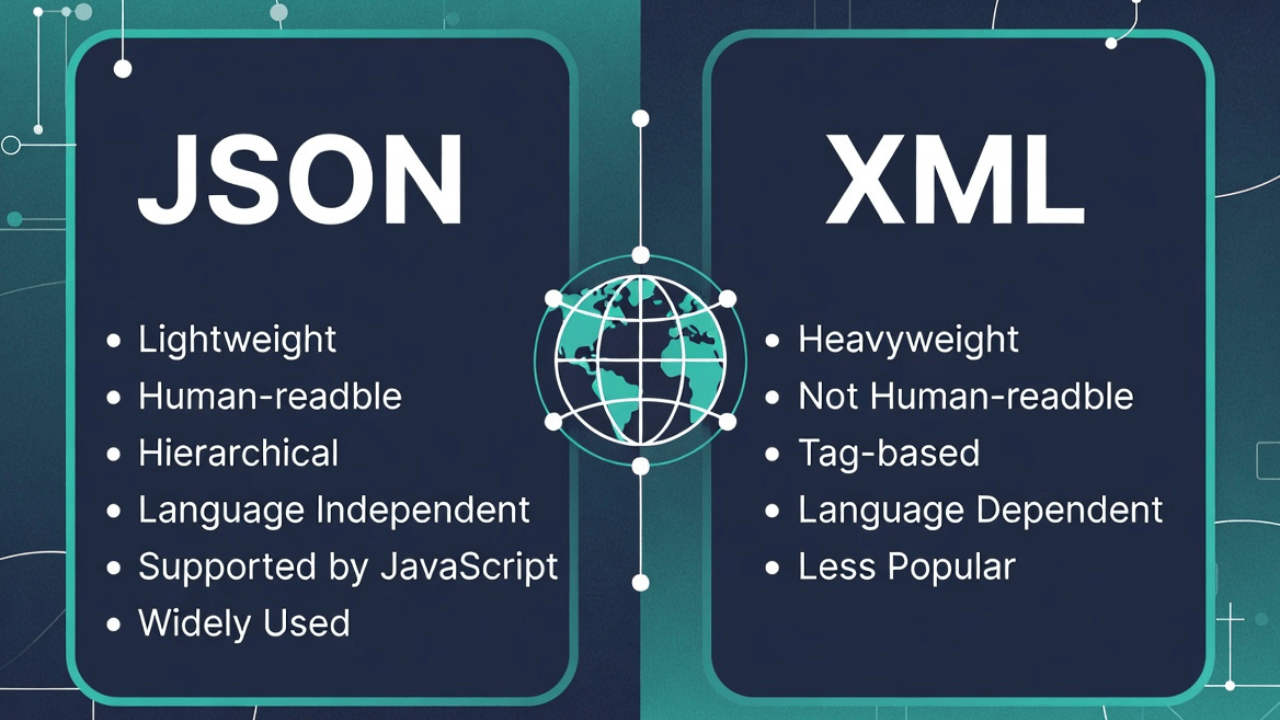
Both represent the same data, but they do it differently. JSON uses key-value pairs and arrays. XML uses tags and attributes. That difference matters more than you might think.

The Key Differences

Let's get into the nitty-gritty of what actually separates these two formats.

1. Syntax and Readability

JSON is more concise. Less typing, less visual clutter. It's easier to read at a glance, especially for developers who are used to JavaScript.

XML is more verbose. More tags, more closing elements, more characters overall. But that verbosity can make the structure clearer, especially for complex nested data.

Winner: JSON for simplicity, XML for clarity in complex structures.

2. Data Types

JSON has built-in support for:

  • Strings
  • Numbers
  • Booleans (true/false)
  • null
  • Arrays
  • Objects

XML treats everything as text. You can add attributes to indicate types, but the parser doesn't enforce them. You have to convert strings to numbers, booleans, etc., yourself.

Winner: JSON. Native data types are a huge advantage.

3. Namespaces and Schemas

JSON doesn't have built-in namespace support. You can simulate it with prefixes in keys, but it's not native.

XML has robust namespace support and schema validation (XSD, DTD). This is huge for enterprise applications where you need to validate data structure.

Winner: XML for enterprise/validation needs, JSON for simplicity.

4. Comments

JSON doesn't support comments. At all. This is by design—JSON is pure data.

XML supports comments: <!-- This is a comment -->

Winner: XML, if you need to document your data inline.

5. Attributes vs. Elements

JSON doesn't have attributes. Everything is either a value or a nested object.

XML has both elements and attributes. You can do things like:

<person id="123" active="true">
  <name>John Doe</name>
</person>

This gives you more flexibility in how you structure data.

Winner: XML for flexibility, JSON for simplicity.

6. File Size

JSON is typically smaller. Less markup, fewer characters.

XML is typically larger. More tags, more closing elements, more overhead.

Winner: JSON. Smaller files mean faster transmission and less storage.

7. Parsing Performance

JSON is faster to parse. It's simpler, and modern JavaScript engines are optimized for it.

XML is slower to parse. More complex syntax means more work for the parser.

Winner: JSON. The performance difference can be significant for large files.

8. Browser Support

JSON has native browser support. JSON.parse() and JSON.stringify() are built into JavaScript.

XML requires a parser (like DOMParser). It's more work to use.

Winner: JSON. Native support is a huge advantage.

When to Use JSON

JSON is the default choice for most modern web development. Here's when it makes sense:

Modern Web APIs

If you're building a REST API for a web application, JSON is almost always the right choice. It's what JavaScript expects, it's what most frontend frameworks work with, and it's what developers are familiar with.

Example: A React app fetching user data from a Node.js API. JSON is the natural fit.

Mobile Applications

Mobile apps (iOS, Android) work seamlessly with JSON. Most mobile SDKs expect JSON, and it's the standard for mobile APIs.

Example: An iOS app consuming a backend API. JSON is the standard.

Configuration Files

For application configuration, JSON is perfect. It's human-readable, easy to parse, and doesn't require special tools.

Example: A package.json file, or application settings stored as JSON.

Real-Time Applications

For WebSocket connections, real-time updates, and streaming data, JSON is ideal. It's lightweight and fast to parse.

Example: A chat application sending messages as JSON over WebSocket.

Microservices

In microservice architectures, JSON is the lingua franca. Services communicate in JSON, and it's what most API gateways expect.

Example: Multiple services in a Kubernetes cluster communicating via JSON APIs.

When to Use XML

XML isn't dead. There are still situations where it's the better choice:

Enterprise Systems

Many enterprise systems are built around XML. If you're integrating with SAP, Oracle, or other enterprise software, you'll likely be working with XML.

Example: Integrating with a legacy enterprise resource planning (ERP) system that only accepts XML.

Document-Oriented Data

If your data is document-like (think Word documents, invoices, reports), XML's structure makes more sense. It's designed for documents.

Example: An invoice system where the XML structure mirrors the document structure.

Data Validation Requirements

If you need strict schema validation (XSD), XML is your only option. JSON Schema exists, but it's not as mature or widely supported as XML schemas.

Example: Financial data where every field must be validated against a strict schema.

Metadata and Attributes

If you need to attach metadata to your data (like IDs, types, or flags), XML's attribute system is more elegant than JSON's workarounds.

Example: A content management system where each element has metadata (author, date, version) attached as attributes.

Industry Standards

Some industries have XML-based standards. Healthcare (HL7), publishing (DocBook), and others use XML because it's part of the standard.

Example: A healthcare application that must comply with HL7 standards.

Side-by-Side Comparison

Let's look at the same data in both formats:

The Data: A user with name, email, and a list of preferences.

JSON:

{
  "user": {
    "id": 12345,
    "name": "John Doe",
    "email": "john@example.com",
    "preferences": [
      "email_notifications",
      "dark_mode",
      "newsletter"
    ]
  }
}

XML:

<user id="12345">
  <name>John Doe</name>
  <email>john@example.com</email>
  <preferences>
    <preference>email_notifications</preference>
    <preference>dark_mode</preference>
    <preference>newsletter</preference>
  </preferences>
</user>

Notice:

  • JSON is more compact (fewer characters)
  • XML makes the structure more explicit (every element is named)
  • JSON uses native arrays; XML uses repeated elements
  • XML can put the ID as an attribute; JSON needs a separate field

Both work. The choice depends on your needs.

Real-World Scenarios

Let me share some real situations where the choice mattered:

Scenario 1: Building a Modern Web App

The Project: A React-based e-commerce site with a Node.js backend.

The Choice: JSON, obviously. The frontend expects JSON, the backend speaks JSON, and there's no reason to use XML.

Why It Worked: Native browser support, fast parsing, easy to work with in JavaScript. Zero friction.

Scenario 2: Integrating with a Legacy System

The Project: Connecting a modern application to a 15-year-old enterprise system.

The Choice: XML. The legacy system only accepted XML, and it had complex schema validation requirements.

Why It Worked: XML's schema validation (XSD) ensured data integrity, and the system's existing XML infrastructure made integration straightforward.

Scenario 3: Mobile App Backend

The Project: REST API for iOS and Android apps.

The Choice: JSON. Mobile SDKs are built for JSON, and it's what mobile developers expect.

Why It Worked: Smaller payloads meant faster load times on mobile networks. Native parsing meant better performance.

Scenario 4: Document Management System

The Project: A system for managing legal documents with metadata.

The Choice: XML. Documents have complex structures, and metadata needed to be attached to elements.

Why It Worked: XML's document-oriented nature matched the use case. Attributes made metadata management cleaner.

Converting Between JSON and XML

Sometimes you need to work with both. Here's how to convert:

JSON to XML

You can use our JSON to XML Converter for quick conversions. It handles nested objects, arrays, and preserves the data structure.

For programmatic conversion, here's a simple approach:

JavaScript:

function jsonToXml(obj, rootName = 'root') {
  let xml = `<${rootName}>`;
  
  for (let key in obj) {
    if (Array.isArray(obj[key])) {
      obj[key].forEach(item => {
        xml += `<${key}>${jsonToXml(item, key)}</${key}>`;
      });
    } else if (typeof obj[key] === 'object' && obj[key] !== null) {
      xml += `<${key}>${jsonToXml(obj[key], key)}</${key}>`;
    } else {
      xml += `<${key}>${obj[key]}</${key}>`;
    }
  }
  
  xml += `</${rootName}>`;
  return xml;
}

XML to JSON

Converting XML to JSON is trickier because XML has attributes and JSON doesn't. You need to decide how to handle them.

Common Approach: Convert attributes to fields with an @ prefix or put them in an _attributes object.

For quick conversions, use our JSON to XML Converter (it works both ways) or a library like xml2js in Node.js.

Performance Comparison

Let's talk numbers. I've benchmarked both formats, and here's what I found:

File Size: JSON is typically 20-30% smaller than XML for the same data.

Parse Time: JSON is 2-3x faster to parse than XML for typical data sizes.

Memory Usage: JSON uses less memory because it's more compact.

Network Transfer: JSON transfers faster because it's smaller.

These differences matter more at scale. For a small API, you might not notice. For a high-traffic service processing millions of requests, JSON's performance advantage is significant.

The Verdict: When to Choose What

Here's my rule of thumb:

Choose JSON if:

  • You're building a modern web application
  • You're working with JavaScript/TypeScript
  • You need fast parsing and small file sizes
  • You're building REST APIs
  • You're working with mobile applications
  • Simplicity is more important than structure

Choose XML if:

  • You're integrating with enterprise/legacy systems
  • You need strict schema validation (XSD)
  • You're working with document-oriented data
  • Industry standards require XML
  • You need attributes and metadata
  • Structure and validation are more important than simplicity

Real-World Use Cases

Understanding when to use JSON vs XML can make or break your project. Here are real scenarios:

Healthcare Systems Integration

Healthcare relies heavily on XML due to HL7 and FHIR standards. Electronic health records, lab results, and patient data exchange use XML for its strict validation and schema support. However, modern healthcare APIs increasingly offer JSON alternatives for easier integration.

Financial Services

Banks and payment processors often use XML for transaction processing due to regulatory requirements and legacy system compatibility. However, modern fintech startups prefer JSON for their APIs, creating a hybrid ecosystem where both formats coexist.

Content Management Systems

Publishing and content management systems traditionally used XML (like DocBook) for document structure. Modern headless CMS platforms now primarily use JSON for API responses, making it easier for developers to build frontends.

E-Commerce Platforms

Modern e-commerce platforms like Shopify and WooCommerce use JSON for their REST APIs. However, when integrating with enterprise resource planning (ERP) systems, XML is often required for compatibility.

For more on data formats, see our guides on JSON basics, JSON payloads, and JSON vs YAML.

Common Mistakes When Choosing Between JSON and XML

Here are pitfalls I've seen developers encounter:

1. Choosing Based on Hype, Not Requirements

Don't pick JSON just because it's "modern" or XML because it's "enterprise." Analyze your actual requirements: Do you need schema validation? Comments? Attributes? Let requirements drive the decision.

2. Ignoring Existing Ecosystem

If your entire infrastructure uses XML, switching to JSON for one service creates complexity. Consider the ecosystem you're working in and the cost of integration.

3. Not Considering Team Expertise

If your team is experienced with XML tooling and schemas, forcing a switch to JSON might slow development. Factor in learning curves and available expertise.

4. Overlooking Performance Implications

For high-traffic APIs processing millions of requests, JSON's parsing speed advantage matters. For batch processing large documents, the difference might be negligible. Profile your specific use case.

5. Forgetting About Validation Needs

If you need strict schema validation, XML's XSD is mature and powerful. JSON Schema exists but isn't as widely supported. Don't underestimate validation requirements. Learn more about JSON validation and JSON Schema.

For more on avoiding JSON issues, read our article on common JSON errors.

Best Practices for Working with Both Formats

In many environments, you'll work with both JSON and XML. Here's how to do it effectively:

1. Use Conversion Tools Wisely: When converting between formats, understand that some features don't translate (XML attributes, JSON data types, comments). Test conversions thoroughly.

2. Maintain Consistent Naming: Whether using JSON or XML, maintain consistent naming conventions for properties/elements across your organization.

3. Document Your Choice: When choosing a format, document why you made that choice. Future maintainers will thank you.

4. Validate Everything: Whether JSON or XML, validate data at system boundaries. Use JSON validation tools for JSON and XSD validators for XML.

5. Format for Readability: Keep your data formatted during development. Use JSON formatting for JSON and XML pretty-printers for XML.

6. Consider Hybrid Approaches: Some systems use JSON for APIs and XML for configuration. This leverages strengths of both formats.

For working with JSON specifically, check our guides on parsing JSON in JavaScript and reading JSON in Python.

Frequently Asked Questions

Can I use both JSON and XML in the same project?

Absolutely! Many projects use JSON for REST APIs (modern, lightweight) and XML for configuration files or enterprise integrations (validation, comments). Use each format where it makes sense. Just ensure your team has tooling for both.

Is XML dying?

No, XML isn't dying—it's evolving. While JSON dominates web APIs and modern development, XML remains essential in enterprise systems, healthcare, publishing, and anywhere strict validation is required. It's not about one replacing the other.

Which is easier to learn for beginners?

JSON is generally easier for beginners. Its syntax is simpler, it maps directly to programming language data structures, and it has fewer concepts to learn. XML's attributes, namespaces, and schemas add complexity.

Can JSON do everything XML can do?

No. XML has features JSON lacks: attributes, namespaces, comments, processing instructions, and mature schema validation. JSON is simpler but less feature-rich. Choose based on whether you need those features.

How do I convert between JSON and XML?

Use conversion tools or libraries, but be aware of limitations. XML attributes don't have direct JSON equivalents, and JSON data types don't exist in XML. Our JSON to XML Converter handles basic conversions, but complex structures may need manual adjustment.

External Resources

To deepen your understanding of JSON and XML:

The Bottom Line

JSON and XML aren't competitors—they're tools for different jobs. JSON is the modern standard for web development, APIs, and mobile apps. XML is still the right choice for enterprise systems, document management, and situations where schema validation matters.

Most developers will use JSON 90% of the time. But that other 10%? XML is still the right tool.

The key is understanding what each format is good at and choosing based on your actual needs, not on which one is "cooler" or "more modern." I've seen projects fail because someone insisted on using JSON when XML was required, and I've seen projects struggle because someone used XML when JSON would have been simpler.

Use JSON for modern web development. Use XML when you need what XML offers. And don't be afraid to use both in the same project if that's what makes sense.

Want to convert between JSON and XML? Check out our JSON to XML Converter. It handles both directions and makes working with either format painless. For more JSON resources, explore our JSON Formatter and guides on working with nested JSON and minifying JSON.

At the end of the day, the best format is the one that solves your problem with the least friction. Sometimes that's JSON. Sometimes that's XML. And that's okay.

Advertisement

K

About Kavishka Gimhan

Passionate writer and content creator sharing valuable insights and practical advice. Follow for more quality content and updates.

Related Articles

You might also be interested in these articles