How to Work with Nested JSON (A Beginner's Guide to Accessing Data)

Advertisement
I got an API response the other day that looked like this:
{
"user": {
"profile": {
"personal": {
"name": "John",
"email": "john@example.com"
},
"settings": {
"theme": "dark",
"notifications": true
}
}
}
}
I needed to get the user's name. Simple, right? I tried data.name. Nothing. I tried data.user.name. Still nothing. Finally, I realized: it's nested three levels deep. I needed data.user.profile.personal.name.
That's when I learned that nested JSON isn't hard—you just need to know how to navigate it. Once you understand the path, accessing nested data becomes straightforward.
Let me show you how to work with nested JSON, from simple examples to complex structures.
What is Nested JSON?
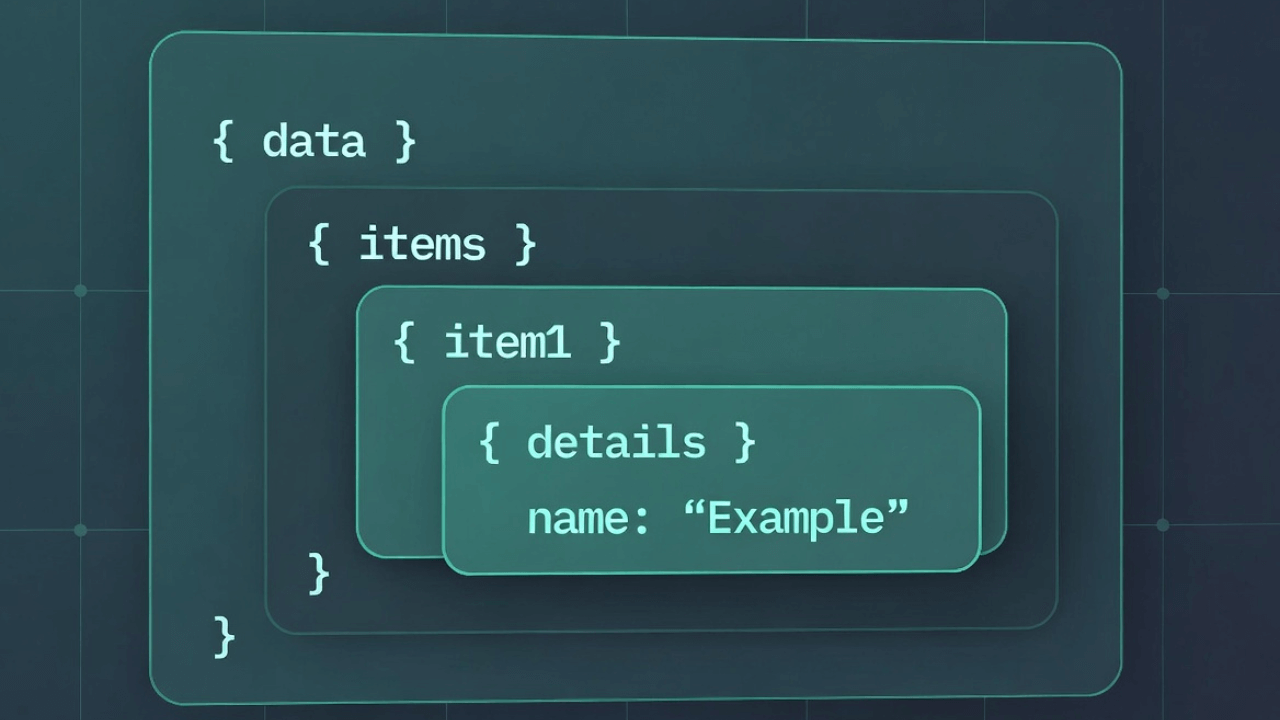
Nested JSON means JSON objects or arrays inside other JSON objects or arrays. Think of it like Russian nesting dolls—objects inside objects inside objects.
Simple (flat) JSON:
{
"name": "John",
"age": 30,
"email": "john@example.com"
}
Nested JSON:
{
"user": {
"name": "John",
"address": {
"street": "123 Main St",
"city": "New York"
}
}
}
The address object is nested inside the user object. That's nesting.
Understanding the Path
To access nested data, you need to follow the path. Think of it like directions:
To get to the street:
- Start with
data(the root) - Go into
user - Go into
address - Get
street
In code, that's: data.user.address.street
Each . means "go into" or "access the property of."
Accessing Nested Data in JavaScript
Here's how to access nested data in JavaScript:
Simple Nested Object
const data = {
user: {
name: "John",
age: 30
}
};
// Access nested property
console.log(data.user.name); // "John"
console.log(data.user.age); // 30
Deeper Nesting
const data = {
user: {
profile: {
personal: {
name: "John",
email: "john@example.com"
}
}
}
};
// Access deeply nested property
console.log(data.user.profile.personal.name); // "John"
With Arrays
When arrays are involved, use bracket notation:
const data = {
users: [
{ name: "John", age: 30 },
{ name: "Jane", age: 25 }
]
};
// Access first user's name
console.log(data.users[0].name); // "John"
// Access second user's age
console.log(data.users[1].age); // 25
Mixed Nesting
Real-world JSON often mixes objects and arrays:
const data = {
company: {
employees: [
{
name: "John",
department: {
name: "Engineering",
location: "New York"
}
}
]
}
};
// Access nested data in array
console.log(data.company.employees[0].department.location); // "New York"
Accessing Nested Data in Python
Python uses similar syntax:
Simple Nested Object
data = {
"user": {
"name": "John",
"age": 30
}
}
# Access nested property
print(data["user"]["name"]) # "John"
print(data["user"]["age"]) # 30
# Or with dot notation (if using a library like types.SimpleNamespace)
Deeper Nesting
data = {
"user": {
"profile": {
"personal": {
"name": "John",
"email": "john@example.com"
}
}
}
}
# Access deeply nested property
print(data["user"]["profile"]["personal"]["name"]) # "John"
With Arrays
data = {
"users": [
{"name": "John", "age": 30},
{"name": "Jane", "age": 25}
]
}
# Access first user's name
print(data["users"][0]["name"]) # "John"
Common Patterns
Here are patterns you'll use all the time:
Pattern 1: Safe Access (Optional Chaining)
Sometimes properties might not exist. Use optional chaining to avoid errors:
JavaScript:
// Safe access - won't crash if property doesn't exist
const name = data?.user?.profile?.name;
// Or with default value
const name = data?.user?.profile?.name || "Unknown";
Python:
# Safe access
name = data.get("user", {}).get("profile", {}).get("name", "Unknown")
Pattern 2: Checking if Property Exists
Before accessing, check if it exists:
JavaScript:
if (data.user && data.user.profile && data.user.profile.name) {
console.log(data.user.profile.name);
}
Python:
if "user" in data and "profile" in data["user"] and "name" in data["user"]["profile"]:
print(data["user"]["profile"]["name"])
Pattern 3: Looping Through Nested Arrays
const data = {
users: [
{ name: "John", hobbies: ["reading", "coding"] },
{ name: "Jane", hobbies: ["traveling", "photography"] }
]
};
// Loop through users
data.users.forEach(user => {
console.log(user.name);
// Loop through hobbies
user.hobbies.forEach(hobby => {
console.log(` - ${hobby}`);
});
});
Pattern 4: Finding Data in Nested Structures
const data = {
users: [
{ id: 1, name: "John", email: "john@example.com" },
{ id: 2, name: "Jane", email: "jane@example.com" }
]
};
// Find user by ID
const user = data.users.find(u => u.id === 2);
console.log(user.name); // "Jane"
Real-World Examples
Let me show you some real scenarios:
Example 1: API Response
{
"status": "success",
"data": {
"user": {
"id": 123,
"name": "John",
"address": {
"street": "123 Main St",
"city": "New York",
"zip": "10001"
}
}
}
}
Accessing the data:
const response = await fetch('/api/user');
const data = await response.json();
const userName = data.data.user.name;
const city = data.data.user.address.city;
Example 2: Configuration File
{
"app": {
"database": {
"host": "localhost",
"port": 5432,
"credentials": {
"username": "admin",
"password": "secret"
}
},
"features": {
"cache": true,
"logging": false
}
}
}
Accessing the data:
const config = require('./config.json');
const dbHost = config.app.database.host;
const cacheEnabled = config.app.features.cache;
Example 3: Complex Nested Structure
{
"company": {
"name": "Acme Corp",
"departments": [
{
"name": "Engineering",
"employees": [
{
"name": "John",
"role": "Developer",
"skills": ["JavaScript", "Python"]
}
]
}
]
}
}
Accessing the data:
// Get first employee's name in first department
const employeeName = data.company.departments[0].employees[0].name;
// Get employee's skills
const skills = data.company.departments[0].employees[0].skills;
// Loop through all departments
data.company.departments.forEach(dept => {
console.log(dept.name);
dept.employees.forEach(emp => {
console.log(` - ${emp.name}: ${emp.role}`);
});
});
Modifying Nested Data
You can also modify nested data:
JavaScript
const data = {
user: {
profile: {
name: "John",
email: "john@example.com"
}
}
};
// Update nested property
data.user.profile.name = "John Smith";
// Add new nested property
data.user.profile.phone = "555-1234";
// Delete nested property
delete data.user.profile.email;
Python
data = {
"user": {
"profile": {
"name": "John",
"email": "john@example.com"
}
}
}
# Update nested property
data["user"]["profile"]["name"] = "John Smith"
# Add new nested property
data["user"]["profile"]["phone"] = "555-1234"
# Delete nested property
del data["user"]["profile"]["email"]
Flattening Nested JSON
Sometimes you need to flatten nested JSON (convert it to a flat structure):
function flattenObject(obj, prefix = '') {
const flattened = {};
for (const key in obj) {
const newKey = prefix ? `${prefix}.${key}` : key;
if (typeof obj[key] === 'object' && obj[key] !== null && !Array.isArray(obj[key])) {
Object.assign(flattened, flattenObject(obj[key], newKey));
} else {
flattened[newKey] = obj[key];
}
}
return flattened;
}
// Usage
const nested = {
user: {
profile: {
name: "John"
}
}
};
const flat = flattenObject(nested);
// Result: { "user.profile.name": "John" }
Common Mistakes
Here are mistakes I've made (and seen others make):
Mistake 1: Forgetting the Path
// Wrong - trying to access directly
const name = data.name; // undefined
// Correct - follow the path
const name = data.user.profile.name;
Mistake 2: Not Handling Missing Properties
// Wrong - crashes if property doesn't exist
const name = data.user.profile.name; // Error if profile doesn't exist
// Correct - use optional chaining
const name = data?.user?.profile?.name;
Mistake 3: Confusing Objects and Arrays
// Wrong - treating array like object
const name = data.users.name; // undefined (users is an array)
// Correct - access array element first
const name = data.users[0].name;
Mistake 4: Not Checking Array Length
// Wrong - might access undefined
const name = data.users[0].name; // Error if users array is empty
// Correct - check length first
if (data.users.length > 0) {
const name = data.users[0].name;
}
Best Practices
Here's what I've learned from working with nested JSON:
-
Use optional chaining when properties might not exist. It prevents crashes.
-
Validate the structure before accessing deeply nested properties. Check if each level exists.
-
Use descriptive variable names when extracting nested data. It makes code more readable.
-
Format your JSON to see the structure clearly. Use our JSON Formatter to make nested structures visible.
-
Document the structure if you're working with complex nested JSON. Write down the path to important data.
-
Use helper functions for frequently accessed nested paths. Don't repeat long paths.
Tools That Help
Working with nested JSON is easier with the right tools:
JSON Formatter: Format your JSON to see the structure. Our JSON Formatter makes nested structures readable.
JSON Tree View: Some tools show JSON in a tree structure, making nesting obvious.
Code Editor: Most editors highlight matching brackets and show you the structure.
Browser DevTools: When debugging, use console.log() to see the structure, or use the debugger to explore nested objects.
Real-World Use Cases
Understanding nested JSON is crucial for modern development. Here are scenarios where you'll encounter deeply nested structures:
API Responses from Complex Systems
When you fetch data from services like GitHub, Twitter, or Google Maps APIs, responses often contain multiple levels of nesting. For example, a GitHub repository response includes owner information, license details, and nested permission objects.
E-Commerce Product Catalogs
Product data typically includes nested categories, variants (size, color), pricing tiers, and inventory information across multiple warehouses. Navigating this structure efficiently is essential for building product pages.
User Profile Management
Modern applications store user preferences, notification settings, privacy controls, and connected accounts as nested objects. You need to access and update specific nested values without affecting others.
Configuration Management
Application configurations often use nested JSON for environment-specific settings, feature flags, and service endpoints. Understanding how to navigate these structures prevents configuration errors.
For more context on handling JSON in different scenarios, check out our guides on JSON payloads in APIs and reading and writing JSON in Python.
Common Mistakes to Avoid
Here are the most frequent errors developers make with nested JSON:
1. Not Handling Undefined Values
Accessing a property on undefined crashes your application. Always use optional chaining (?.) or check if properties exist before accessing them.
2. Mutating Nested Objects Unintentionally
When you modify a nested object, you might accidentally modify the original if you haven't created a deep copy. Use deep cloning techniques or libraries like Lodash's cloneDeep.
3. Confusing Array Index with Object Keys
Arrays use numeric indices ([0]), objects use string keys (.name). Mixing these up is a common source of undefined errors.
4. Forgetting to Parse JSON Strings
When you receive JSON from an API or file, it's a string. You must parse it with JSON.parse() before accessing nested properties. Learn more in our guide to parsing JSON in JavaScript.
5. Hardcoding Deep Paths
Instead of writing data.user.profile.settings.theme repeatedly, extract it into a variable or use a helper function. This makes refactoring easier.
For more on avoiding JSON errors, see our article on common JSON errors and how to fix them.
Best Practices for Nested JSON
After working with complex nested structures for years, here are my recommendations:
1. Use TypeScript or JSON Schema: Define your data structure explicitly. This provides autocomplete and catches errors before runtime.
2. Flatten When Possible: If you control the data structure, consider flattening deeply nested objects. Sometimes user_name is better than user.profile.personal.name.
3. Create Helper Functions: For frequently accessed paths, create getter functions. This centralizes access logic and makes refactoring easier.
4. Validate Structure: Before processing nested data, validate that the structure matches your expectations. Use JSON validation techniques to catch structural issues early.
5. Use Lodash or Similar Libraries: Libraries like Lodash provide _.get() which safely accesses nested properties with a default value: _.get(data, 'user.profile.name', 'Unknown').
6. Document Complex Structures: For deeply nested JSON, maintain documentation showing the structure and important paths. This helps team members understand the data model.
If you're working with JSON configuration files, our JSON vs YAML comparison might help you choose the right format.
Frequently Asked Questions
How deep can JSON nesting go?
Technically, JSON has no depth limit, but practical limits exist. Most JSON parsers handle 100+ levels of nesting, but deeply nested structures (10+ levels) become hard to maintain and slow to parse. If you need extreme nesting, consider restructuring your data model.
What's the difference between dot notation and bracket notation?
Dot notation (data.name) is cleaner but only works with valid JavaScript identifiers. Bracket notation (data['name']) works with any string, including those with spaces or special characters, and allows dynamic property access: data[variableName].
How do I convert nested JSON to flat JSON?
You can flatten nested JSON by creating keys that represent the path, like user.profile.name instead of nested objects. Use the flattening function shown earlier in this article, or libraries like flat in npm. Sometimes you might also need to convert JSON to CSV which inherently flattens the structure.
Can I use destructuring with nested JSON?
Yes! JavaScript destructuring works with nested objects: const { user: { profile: { name } } } = data; extracts name from a nested structure. However, be careful—if any intermediate property is undefined, it will throw an error.
How do I search for a value in deeply nested JSON?
You'll need to write a recursive function that traverses all objects and arrays, checking each value. Libraries like Lodash provide _.find() and similar utilities that can search nested structures more easily.
External Resources
To master nested JSON and related concepts:
- MDN Web Docs: Working with JSON - Comprehensive guide to JSON in JavaScript
- JSON.org - Official JSON specification and syntax reference
- Lodash Documentation - Utility library for working with nested objects safely
- JSONPath Specification - Query language for JSON, similar to XPath for XML
The Bottom Line
Nested JSON isn't complicated—it's just objects and arrays inside other objects and arrays. To access nested data, you follow the path using dot notation (or bracket notation for arrays).
Key takeaways:
- Use
.to access nested object properties - Use
[]to access array elements - Combine them:
data.users[0].profile.name - Use optional chaining (
?.) to safely access properties that might not exist - Format your JSON to see the structure clearly
- Validate before accessing deeply nested properties
The more you work with nested JSON, the more natural it becomes. Start with simple examples, then work your way up to complex structures.
Want to see the structure of your nested JSON? Use our JSON Formatter to format it. The tree view makes nested structures especially clear—you can see exactly how data is organized and what path to follow. For validating your JSON structure, check out our JSON validation guide.
Remember: nested JSON is just a path. Follow the dots (and brackets), and you'll get to your data. It's like following directions—once you know the path, you can't get lost. And if you're working with JSON files, learn how to open and read JSON files effectively.
Advertisement
About Kavishka Gimhan
Passionate writer and content creator sharing valuable insights and practical advice. Follow for more quality content and updates.